
MW2 Host Blocker
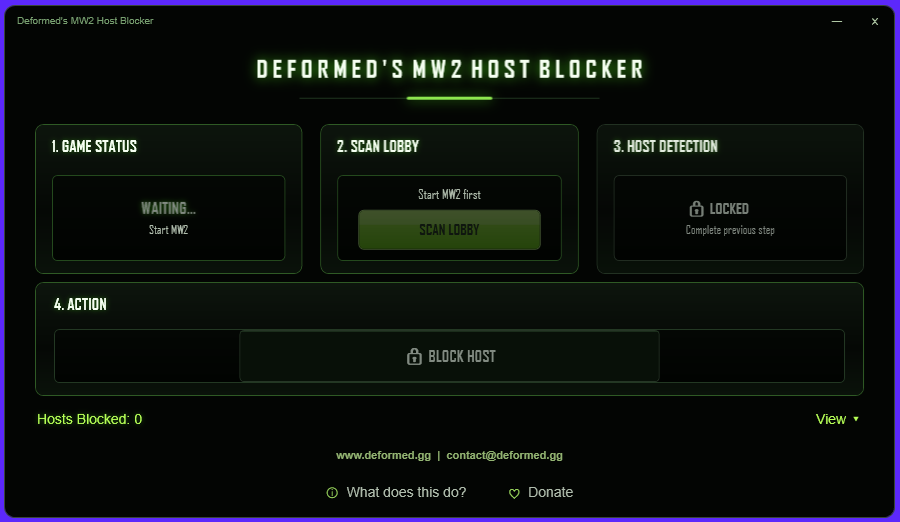
How to use
- 1 Run MW2HostBlocker.exe. Windows will ask for Administrator permission - this is required to scan traffic and manage firewall rules.
- 2 Open MW2 and join a match. Once the game is running, the app will show MW2 DETECTED.
- 3 When you are in a live game (actually in the match, not a lobby or loading screen), click SCAN LOBBY. Give it a few seconds.
- 4 Once it says HOST DETECTED, click BLOCK HOST.
- 5 Leave and requeue. That host is now blocked on your machine and matchmaking will skip them going forward.
If the app says NO HOST, make sure you are in an active match and not a pre-game lobby, then try scanning again.
Click View at the bottom of the app to manage your blocked hosts. You can leave notes on each one, remove individual blocks, or clear everything at once.
How it works
MW2 multiplayer runs on a peer-to-peer setup where one player in the lobby acts as the host for everyone else. During a match, most of your network traffic goes directly to that one person.
The app watches your incoming traffic while you play and finds the IP address that is sending you the most data - that is the host. It then adds a Windows Firewall rule to block that IP in both directions.
Once blocked, you will not connect to that host again. The block only lives on your PC - it does not affect other players, and nothing is sent anywhere.
No game files are touched. No memory is read. The only change made to your system is the firewall rules the app creates, all named "Deformed MW2 Blocker - ..." so you can find and remove them yourself in Windows Defender Firewall any time you want.
Virus scan & trust
ANTIVIRUS Some AV engines may flag this with a generic warning. That is a false positive - it happens with unsigned tools that watch network traffic and touch firewall rules. Windows Defender and all major engines report it clean. View VirusTotal report →
SMARTSCREEN Windows may show a SmartScreen prompt on first run since this is an unsigned tool. Click "More info" then "Run anyway".
WHY ADMIN? Administrator access is needed to read your own incoming network traffic and to add or remove Windows Firewall rules. That is the full extent of it.
YouTube guide COMING SOON
Disclaimer
Deformed's MW2 Host Blocker is provided as-is, without warranty of any kind.
This tool is only meant to help you avoid repeatedly landing in the same bad lobby by blocking a host on your own machine. It does not modify the game, inject into any process, interact with Steam or VAC, read game memory, or send data to any server.
You are responsible for how you use this software. Do not use it to target, harass, disrupt, or identify other players.
By using this software, you agree the developer is not responsible for misuse, account issues, network issues, game bans, firewall changes, or any other consequences.